

 Start a conversation
Workflow automation with n8n
n8n workflow automation guide: what it is, what it costs, and whether it's right for your business
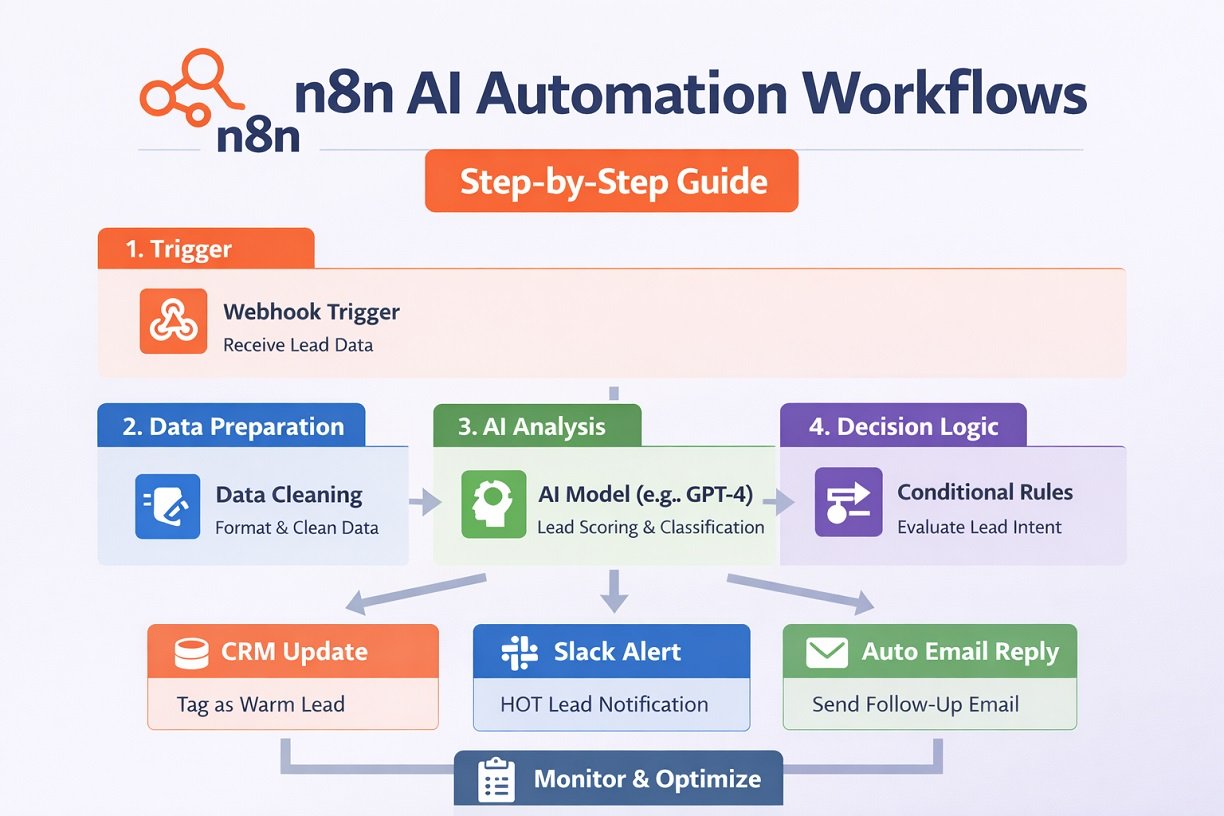
Use n8n if you're running 10,000+ workflow executions monthly and can assign a developer to maintenance, because the cost per execution drops to near zero compared to Zapier's tiered pricing. Otherwise, if your team has zero coding comfort and won't hire anyone technical, Zapier or Make get you functional faster without the self-hosting operational burden. The rest of this guide covers what actually differs between these tools, what self-hosting costs in rand terms for a South African business, and where n8n's data sovereignty advantage matters under POPIA.
What n8n actually is
n8n is a workflow automation platform. You build workflows visually, node by node, connecting triggers (a new WhatsApp message, a PayFast webhook, a form submission) to actions (send a reply, update a CRM record, write to a database, call an AI model). It's the same basic idea as Zapier or Make, but built for people who don't mind opening a code editor when the visual builder runs out of road.
Node-based automation, not just app connectors
The core unit in n8n is the node. Each node does one thing: fetch data from an API, transform a JSON payload, run a conditional check, call an LLM, send a message. You drag nodes onto a canvas and connect them with lines, and the workflow runs left to right (or in loops, branches, and merges, depending on what you build).
Where n8n differs from a pure "connector" tool like Zapier is that most nodes expose the raw data underneath. Zapier hides a lot of complexity behind friendly field pickers. n8n shows you the actual JSON coming back from an API call, and lets you write expressions (small snippets of JavaScript) to reshape that data before it hits the next node. This is the difference between "connecting apps" and "building a program," and it's the reason n8n workflows can do things that would take three separate Zaps and a Google Sheet to fake in Zapier.
Fair-code licensing: why n8n isn't technically open source
n8n calls itself "fair-code," which is a licensing model, not open source in the OSI-approved sense. The source code is visible and you can self-host it, modify it, and use it commercially for internal purposes without paying anyone. What you can't do is take n8n's code and resell it as a competing hosted product. That restriction is what keeps n8n's own cloud business viable while still giving away the core product for free.
For most businesses this distinction is academic. You're not trying to build a competing SaaS on top of n8n's codebase, you just want to automate WhatsApp replies or sync leads into a CRM. But it's worth knowing the label "open source" gets thrown around loosely in n8n marketing content, and it's not strictly accurate. If procurement or legal at your company cares about license terms (some do, especially in regulated industries), read the actual Sustainable Use License before you commit infrastructure budget to it.
Where it came from: Jan Oberhauser's 2019 Berlin side project
n8n started in 2019 as Jan Oberhauser's side project in Berlin, built out of frustration with how expensive and locked-down existing automation tools were. The name stands for "nodemation," compressed to n8n the way "internationalization" becomes "i18n." It's grown from a niche developer tool into a genuinely popular automation platform with a large community building and sharing workflow templates, which matters practically: when you're stuck, there's usually someone who's solved your exact problem and posted the workflow JSON publicly.
n8n vs Zapier vs Make: the real trade-offs
There's no universally "best" tool here, only the right tool for your team's technical comfort and your monthly automation volume. Zapier is the easiest to start with and has the biggest app library. Make sits in the middle with a strong visual builder and moderate pricing. n8n is the cheapest at scale and the most flexible, but it asks more of you upfront.
Cost at scale: why 10,000 monthly executions changes the maths
Zapier and Make both price primarily on the number of "tasks" or "operations" your workflows run each month. This works fine at low volume. It gets painful fast once you're running real business automation: a WhatsApp bot handling a few hundred conversations a day, a lead router touching every form submission, an order sync firing on every e-commerce sale. Ten thousand executions a month on Zapier can push you into their higher pricing tiers, often running to hundreds of US dollars monthly, and that's before you add more automations.
n8n Cloud also has execution-based tiers, but they're generally more generous per dollar. Self-hosted n8n breaks the model entirely: you pay for a server, not for executions. Whether you run 500 or 500,000 workflow executions a month, your cost is the same VPS bill. This is the single biggest reason technical teams migrate from Zapier to n8n once volume grows, and it's why the "n8n vs Zapier" conversation almost always turns into a spreadsheet exercise once someone actually models 12 months of expected volume.
Integrations: 1,000+ native nodes vs Zapier's larger app library
n8n ships with over a thousand native integration nodes, and that number keeps growing. Zapier still has a larger raw catalogue of app connectors, especially for long-tail SaaS tools with small user bases. In practice this gap matters less than it sounds, because n8n has a generic HTTP Request node that can talk to any API with a documented endpoint, which covers the gap for anything without a dedicated node. Zapier's no-code users don't have that fallback in the same way, so a missing integration on Zapier is often a hard stop, while a missing integration on n8n is a ten-minute HTTP node setup for someone comfortable reading API docs.
For South African businesses specifically, this matters with local tools. PayFast, Yoco, and most SA-specific SaaS products don't have dedicated Zapier or n8n nodes. You're building HTTP Request nodes and webhook listeners either way, so the "integration count" marketing angle matters less here than the flexibility to build a custom connection quickly.
Who each tool actually suits: developer vs non-technical teams
If nobody on your team can write or read JavaScript, and you don't plan to hire anyone who can, Zapier or Make will get you further faster with less risk. The visual interfaces are genuinely more forgiving, error messages are friendlier, and support is more consumer-oriented.
If you have a developer on staff, a technical founder, or budget to bring in someone who builds these professionally, n8n's lower long-term cost and deeper customisation usually wins. This is also where the honest angle in this guide matters: the "learning curve" people mention as an abstract downside of n8n is, in practice, the difference between a workflow that survives a WhatsApp API schema change unattended and one that silently drops messages for a week before anyone notices. A no-code Zapier flow will often just stop and show an error in a dashboard nobody checks. A properly built n8n workflow with error handling, retries, and alerting will catch the same failure and page someone before a customer notices.

Is n8n free? What self-hosting really costs
Yes, n8n is free if you self-host the Community Edition, but "free" means free of license fees, not free of infrastructure cost or your time. You still pay for a server, and you still need someone who can maintain it. n8n Cloud, by contrast, is a paid subscription with tiers based on execution volume, and it removes the server management entirely.
Community Edition: unlimited workflows, but not unlimited effort
The Community Edition gives you unlimited workflows, unlimited executions, and the full node library, with no license fee. What you don't get is the managed infrastructure, the built-in high availability, or the enterprise features like SSO and advanced permissions. You're responsible for updates, backups, uptime, and security patching. For a solo operator or small team running a handful of workflows, this is a reasonable trade. For a business where a dropped WhatsApp automation means lost revenue every hour it's down, "you're responsible for uptime" is a real operational commitment, not a footnote.
We built a WhatsApp onboarding workflow for a creator platform that ran on self-hosted n8n, and the hidden cost showed up in week two when a security update was released. The decision was either take the server down during business hours to patch or run unpatched for a few days. Self-hosting meant owning that decision directly instead of delegating it to a vendor SLA.
Cloud pricing tiers and what changed in 2024
n8n Cloud pricing is structured around monthly workflow executions, with tiers scaling from a starter plan suited to testing and small automations up through business tiers built for higher volume and team collaboration features like shared credentials and role-based access. Pricing has shifted over the past couple of years as n8n has matured its cloud offering and pushed more enterprise features (advanced permissions, audit logs, dedicated support) into higher tiers rather than the base Community Edition. The practical takeaway: check current pricing directly before budgeting, because it moves, and modelling your expected monthly executions before you sign up will save you from a surprise upgrade three months in.
VPS hosting costs in ZAR terms and what that means for SA businesses
Here's where most n8n guides go quiet, because they're written for a US or European audience paying US-dollar-denominated cloud bills without thinking twice. If you're a South African business, both n8n Cloud and most VPS providers price in USD. That means your automation cost isn't fixed in rand, it moves with the exchange rate every month. A $50 n8n Cloud plan that felt reasonable at R18/USD feels different at R19.50/USD, and over a year that drift adds up in a way a ZAR-denominated software subscription wouldn't.
Self-hosting on a VPS doesn't remove this problem, since most reputable VPS providers (DigitalOcean, Hetzner, AWS) also bill in USD or EUR. A small VPS capable of running n8n comfortably for a business handling a few thousand WhatsApp conversations a month typically costs the equivalent of R150 to R400 monthly, depending on provider and specs. That's dramatically cheaper than most Zapier or n8n Cloud business tiers, but it comes with the caveat that you're now responsible for server security, backups, and choosing a server region that doesn't add unnecessary latency to Meta's WhatsApp servers or your local payment gateways. For a full breakdown of what this looks like for a WhatsApp-specific setup, we've written separately about what WhatsApp automation actually costs in ZAR, covering the API fees, hosting, and build costs together rather than in isolation.
Self-hosting n8n for data sovereignty and POPIA
Self-hosting matters most when you're processing South African customers' personal information, because it puts you in direct control of where that data lives and who can access it, which is a meaningfully different compliance posture than routing it through a third-party US cloud automation platform. POPIA doesn't ban cloud tools outright, but it does require you to know exactly where data goes and to justify that with a lawful basis and adequate safeguards.
Why self-hosted matters for businesses handling customer data
When you run n8n Cloud, your workflow data, including any customer information passing through it, sits on n8n's infrastructure, hosted primarily in the EU or US depending on the region you select. That's not automatically a POPIA violation, but it does trigger the cross-border transfer provisions in POPIA, which require you to ensure the receiving country has adequate data protection or that you've put contractual safeguards in place.
Self-hosting on a server you control, ideally in a region close to South Africa or at minimum one you can name and justify in a privacy policy, removes a layer of that complexity. You know exactly where the database lives, you control backup retention, and you can produce a straight answer when a client or regulator asks "where does customer data actually sit." For businesses running WhatsApp automation that touches ID numbers, medical information, or payment details, this isn't a nice-to-have, it's the difference between a defensible compliance position and a shrug.
What POPIA actually requires from your automation stack
POPIA requires a lawful basis for processing, purpose limitation (only collect and use what you need), security safeguards appropriate to the risk, and the ability to respond to data subject access and deletion requests. None of this is n8n-specific. It applies whether you're using n8n, Zapier, Make, or a custom-built system. What n8n gives you that a black-box SaaS tool doesn't is visibility: you can see exactly what data moves through every node, log it, encrypt it at rest, and set retention policies because you own the database, not because a vendor promises to.
That said, self-hosting doesn't automatically make you compliant. Weak server security, unpatched software, or sloppy credential management inside your n8n instance is a POPIA risk regardless of how virtuous the hosting location is. For a detailed walk-through of what actually needs to be true for WhatsApp automation to be POPIA compliant, read the POPIA compliance guide before you assume self-hosting alone solves the problem.
Where n8n fits next to WhatsApp Business API and payment data
This is where the practical complexity really shows up, and it's the part most generic n8n content skips entirely. A typical South African business automation setup has WhatsApp Business API messages flowing in through Meta's servers, PayFast or Yoco webhooks firing on payment events, and customer records sitting in a CRM, all converging on a single n8n instance. That instance needs to handle WhatsApp's rate limits without silently dropping messages during a spike, verify PayFast webhook signatures correctly so nobody can spoof a "payment successful" event, and store customer data in a way that satisfies POPIA if a customer ever asks what you hold on them.
Server region choice affects more than compliance here too. If your n8n instance sits on a server geographically far from Meta's WhatsApp infrastructure, you'll see it in response latency, which matters when a customer expects an instant automated reply. We've seen the latency difference between an n8n instance running in EU data centres versus Hetzner's Johannesburg region run at 400ms versus 80ms on the same webhook payload, and that difference shows up in customer experience. Picking a server region is a genuine trade-off between compliance comfort, latency to WhatsApp's servers, and cost, and it's a decision that gets made once and lived with for years, so it's worth getting right at the start rather than migrating later.
What n8n is actually used for
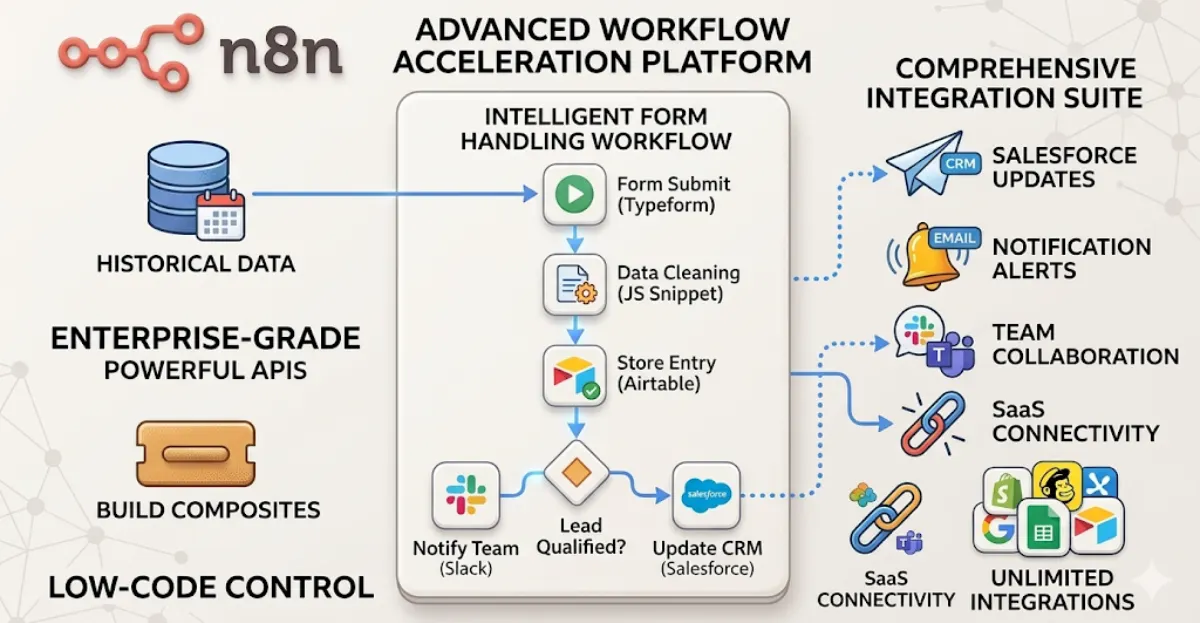
n8n gets used for almost anything that involves moving data between systems or triggering an action based on an event, but four categories cover most real business use: CRM and lead automation, customer onboarding, AI agent pipelines, and e-commerce order syncing.
CRM automation and lead routing
The most common starting point is connecting a lead source (a website form, a WhatsApp inquiry, a Facebook ad lead form) to a CRM, with logic in between to route, tag, and prioritise leads before a human ever sees them. A workflow might check which product a lead is asking about, look up whether they're an existing customer, assign them to the right sales rep based on region or language, and fire off a personalised WhatsApp acknowledgment, all within seconds of the lead coming in. This is the kind of automation that pays for itself quickly because it removes the lag between "lead arrives" and "someone follows up," which is consistently one of the biggest predictors of conversion rate in South African sales teams working WhatsApp-first.
Customer onboarding and document processing
Onboarding workflows handle the repetitive parts of getting a new customer set up: collecting documents (ID copies, proof of address, signed agreements), validating them, extracting data from PDFs or images using OCR nodes or AI vision models, and pushing the result into whatever system runs the actual business. For regulated industries like fintech or lending, this often needs to interact with FICA verification steps too. We built exactly this kind of setup for a creator platform, and the detail is worth looking at if you want to see a real WhatsApp onboarding workflow built for a creator platform rather than a theoretical description, because the edge cases (users sending photos instead of PDFs, resubmitting the wrong document, going quiet halfway through) are where most onboarding automations actually break.
AI agent pipelines: the shift from webhooks to agents
The newest and fastest-growing use case for n8n is AI agent pipelines, where instead of a fixed sequence of nodes, a workflow hands a decision off to an LLM that decides what to do next based on the conversation or data in front of it. n8n has built native support for this with AI agent nodes that can call tools, query databases, and make multi-step decisions rather than following a rigid if-this-then-that structure. This matters for WhatsApp automation specifically because customer conversations don't follow scripts, and an agent-based workflow can handle "actually I meant something different" in a way a purely rule-based webhook chain can't.
The real risk here is what happens when you give an LLM access to customer data or payment systems without guard rails. We've seen builds where an agent-based workflow was allowed to view full customer payment history and make refund decisions, and the first test run approved a refund that violated the company's policy because the LLM had no constraints. It's not a curiosity, it's the area where things go wrong fastest if built carelessly, since an LLM with too much autonomy is a genuine risk to revenue and compliance, not just a technical novelty.
E-commerce order management and data sync
n8n is also widely used to keep e-commerce systems in sync: pulling orders from Shopify or WooCommerce, updating inventory across multiple sales channels, triggering fulfilment notifications, and reconciling payments from gateways like PayFast or Yoco against orders in the store. For South African online sellers, this often includes handling the specifics of local payment gateway webhooks, which don't behave identically to Stripe's or PayPal's, and building retry logic for when a webhook fires before the corresponding order record exists yet, a timing issue that trips up a surprising number of first-time n8n builds. If you're weighing up whether to build this yourself or bring in someone who's solved it before, read about accepting WhatsApp payments through PayFast and Yoco before you start, since the webhook handling details differ meaningfully between the two.
How hard is n8n to learn
n8n's visual builder gets a reasonably technical person about 80% of the way to a working automation without writing a line of code, but that last 20% almost always requires basic JavaScript, and pretending otherwise is where most "n8n is easy" claims fall apart.
The visual builder gets you 80% of the way
Dragging nodes onto a canvas, connecting them, and configuring straightforward fields is genuinely intuitive, and n8n's interface does a good job of showing you sample data at each step so you can see what you're working with. For simple workflows (trigger, transform, send), you can build something functional in under an hour with no coding background at all, especially using one of the thousands of community-shared templates as a starting point.
Where you'll hit JavaScript, and why that's not optional forever
The wall shows up when you need conditional logic more complex than a basic if/else, when you're reshaping messy JSON from an API into a different shape another node expects, or when you're handling errors gracefully instead of letting a workflow just die silently. n8n's Code node and expression editor both use JavaScript, and at that point you're either writing it yourself or you're stuck. This is genuinely fine for a developer or a technical founder who's comfortable in a browser console. It's a real barrier for someone who's never written a line of code and doesn't plan to start.
What a non-technical team should realistically expect
A non-technical team can absolutely run n8n day-to-day once a workflow is built, monitoring it, tweaking simple field values, and handling minor updates. What a non-technical team shouldn't expect is to build production-grade, error-handled, self-healing workflows from scratch without either investing serious time in learning JavaScript basics or bringing in someone who already knows how. This is the honest version of "n8n has a learning curve" that most comparison articles gloss over: it's not a UX inconvenience, it's the line between a workflow that quietly breaks and one that alerts someone before customers notice.
When n8n is the wrong tool
n8n is the wrong choice when your workload is genuinely heavy data engineering, when your team has zero appetite for any technical involvement, or when the cost of building it wrong exceeds the cost of just hiring someone who's built it before.
ETL and heavy data workloads: where n8n wins outright
For moving and transforming large volumes of structured data between systems, n8n is a strong fit and often outperforms Zapier or Make on both cost and capability, since it wasn't built with the same execution-based pricing ceiling. If your use case is genuinely ETL (extract, transform, load) at scale, n8n handles it well, especially self-hosted where execution volume doesn't cost extra.
When Zapier or a managed service beats DIY workflow building
If your automation needs are simple, low-volume, and unlikely to grow much (a handful of workflows connecting mainstream apps you already pay for), the time you'd spend learning n8n and maintaining a server isn't worth the money you'd save over a Zapier subscription. Similarly, if your team has no technical capacity at all and no plan to develop any, a fully managed service, even at a higher monthly cost, removes a maintenance burden that will otherwise land on whoever's least equipped to deal with it when something breaks at 11pm on a Friday.
When to hire someone to build it instead of building it yourself
If your automation touches customer data under POPIA, payment processing, or WhatsApp Business API rate limits, and nobody on your team has built production automation before, the cost of getting it wrong (dropped messages, compliance exposure, silent failures) usually outweighs the cost of hiring someone who has. This is genuinely the calculation worth making honestly rather than defaulting to DIY because n8n is "free." Read about what an AI automation agency actually builds and charges before deciding, or understand how custom AI development is scoped and priced in South Africa more broadly, because those numbers help frame whether DIY or hired-out is the better call for your specific volume and risk profile.
Common questions
Is n8n free? What's the actual cost of self-hosting vs cloud?
The Community Edition is free with no license fee if you self-host, but you pay for server hosting (roughly R150 to R400/month for a small VPS) and your own time for maintenance. n8n Cloud charges a monthly subscription based on execution volume, priced in USD, which means your cost moves with the rand exchange rate month to month. Calculate your expected monthly executions before committing to either, since the crossover point where self-hosting becomes cheaper than Cloud typically sits around 15,000 to 20,000 executions depending on the Cloud tier you'd hit.
Is n8n hard to learn? Do you need to code?
Basic workflows are easy to build visually with no coding. Complex logic, error handling, and reshaping messy API data almost always require JavaScript in n8n's Code node or expression editor. Expect to hit that wall within your first few real-world workflows, especially anything handling WhatsApp or payment data reliably. Budget a week or two for someone with no coding background to get comfortable enough to build unsupervised, or bring in someone who already codes.
n8n vs Zapier vs Make: which should I use?
Zapier suits non-technical teams with simple, low-volume needs and wants the largest app library. Make sits in between with a strong visual builder and middling pricing. n8n wins on cost at scale and flexibility if someone on your team can write basic JavaScript and you're running 10,000+ monthly executions. If your team has zero technical comfort and your volume is low, Zapier removes the maintenance burden. If your team includes a developer and your volume is high, n8n almost always wins financially.
Common questions
Is n8n free? What's the actual cost of self-hosting vs cloud?
The Community Edition is free with no license fee if you self-host, but you pay for server hosting (roughly R150 to R400/month for a small VPS) and your own time for maintenance. n8n Cloud charges a monthly subscription based on execution volume, priced in USD, which means your cost moves with the rand exchange rate month to month. Calculate your expected monthly executions before committing to either, since the crossover point where self-hosting becomes cheaper than Cloud typically sits around 15,000 to 20,000 executions depending on the Cloud tier you'd hit.
Is n8n hard to learn? Do you need to code?
Basic workflows are easy to build visually with no coding. Complex logic, error handling, and reshaping messy API data almost always require JavaScript in n8n's Code node or expression editor. Expect to hit that wall within your first few real-world workflows, especially anything handling WhatsApp or payment data reliably. Budget a week or two for someone with no coding background to get comfortable enough to build unsupervised, or bring in someone who already codes.
n8n vs Zapier vs Make: which should I use?
Zapier suits non-technical teams with simple, low-volume needs and wants the largest app library. Make sits in between with a strong visual builder and middling pricing. n8n wins on cost at scale and flexibility if someone on your team can write basic JavaScript and you're running 10,000+ monthly executions. If your team has zero technical comfort and your volume is low, Zapier removes the maintenance burden. If your team includes a developer and your volume is high, n8n almost always wins financially.
About Sagentics
Sagentics is an AI systems studio based in South Africa. We design and build WhatsApp automation, n8n workflows, and custom AI products for local and international clients. We write from systems we have actually shipped.
Start a WhatsApp conversation with SagenticsRelated reading
- Document automation for quotes and invoices: how to build the full loop in n8n
- n8n vs Make vs Zapier: which one actually wins in 2026
- Self-hosting n8n vs cloud: what actually decides it
- n8n lead capture CRM automation: how to build it right for a South African business
- what actually needs to be true for WhatsApp automation to be POPIA compliant
- what WhatsApp automation really costs in ZAR
- how custom AI development is scoped and priced in South Africa
- what an AI automation agency actually builds and charges
- accepting WhatsApp payments through PayFast or Yoco
- a real WhatsApp onboarding workflow built for a creator platform
- Sagentics' AI automation work