

 Start a conversation
Workflow automation with n8n
n8n error handling for production: how to stop workflows failing silently

n8n stops a workflow dead the moment a node fails and sends no alert unless you build that behaviour yourself. The single highest-impact fact most teams learn the hard way: n8n retries the entire workflow from the start, not from the failed node, which means every workflow touching payments, messages, or CRM writes needs idempotent design or you'll duplicate those actions on retry.
Production reliability comes from combining an Error Trigger workflow, correct use of Retry On Fail versus Continue On Fail, idempotent retry design, and a dead-letter path for anything touching money or customer messages. Most teams discover this when a customer asks why their payment confirmation never arrived, or why they received two invoice emails.
This guide covers what actually breaks in production n8n instances, the native features that fix it, and the one detail almost every other guide skips: n8n does not retry from the failed node. That single fact changes how you have to design every workflow with side effects.
Why n8n workflows fail silently by default
What actually happens when a node errors with no configuration
By default, when a node throws an error, the workflow execution stops. It gets marked as "failed" in the executions list. Nothing else happens. No email, no Slack message, no webhook fires. If nobody is actively watching the executions tab, that failure sits there invisible until a customer complains or a report doesn't show up.
Why this is a safe default, not a bug
n8n has no way of knowing what "failure" should trigger for your business. A silent stop is safer than n8n guessing at retry logic or alerting behaviour that might not fit your workflow. This is deliberate design, not an oversight, but it means every production instance needs explicit error handling built on top, the same way you'd add monitoring to any backend service.
The dev-to-production gap: what testing never shows you
In development, you watch every execution manually. You see failures immediately because you're staring at the canvas. In production, workflows run unattended, often at 2am, often triggered by webhooks from PayFast, Yoco, or WhatsApp that never repeat the same way twice. The failure modes that matter—expired tokens, malformed webhook payloads, rate limits, timeouts—only show up under real traffic. Development teaches you the happy path. Production is where the unhappy paths live and cost you money.
The Error Trigger node: n8n's actual safety net
How Error Trigger catches failures from any workflow
The Error Trigger node starts a separate workflow whenever a linked workflow throws an unhandled error. You attach it in each workflow's settings under "Error Workflow", pointing to a dedicated error-handling workflow. When something fails, n8n passes the error details, including the failed node name, error message, and execution ID, into that workflow automatically.
Building a dedicated error-handling workflow
Build one central error workflow, not one per automation. It should receive the error payload, extract the workflow name and node that failed, check severity, and route to the right channel. Centralising this means you fix your alerting logic once instead of copying it into every workflow you build.
What to log versus what to alert on
Log everything: every error, timestamp, execution ID, and workflow name, into a database or spreadsheet for later analysis. Alert only on what needs a human right now: payment webhook failures, WhatsApp message send failures, CRM writes that didn't complete. Not every error deserves a Slack ping. Some just need a record.
Retry on fail vs continue on fail: using the right tool
When Retry On Fail helps and when it duplicates records
Retry On Fail re-attempts a node a set number of times before failing the workflow. It's correct for transient issues: rate limits, brief network drops, temporary API unavailability. It's wrong when the node has already partially succeeded before failing, for example a CRM write that created the record but failed on a follow-up field update. Retrying blindly there creates duplicate records.
When Continue On Fail is correct and when it just hides failures downstream
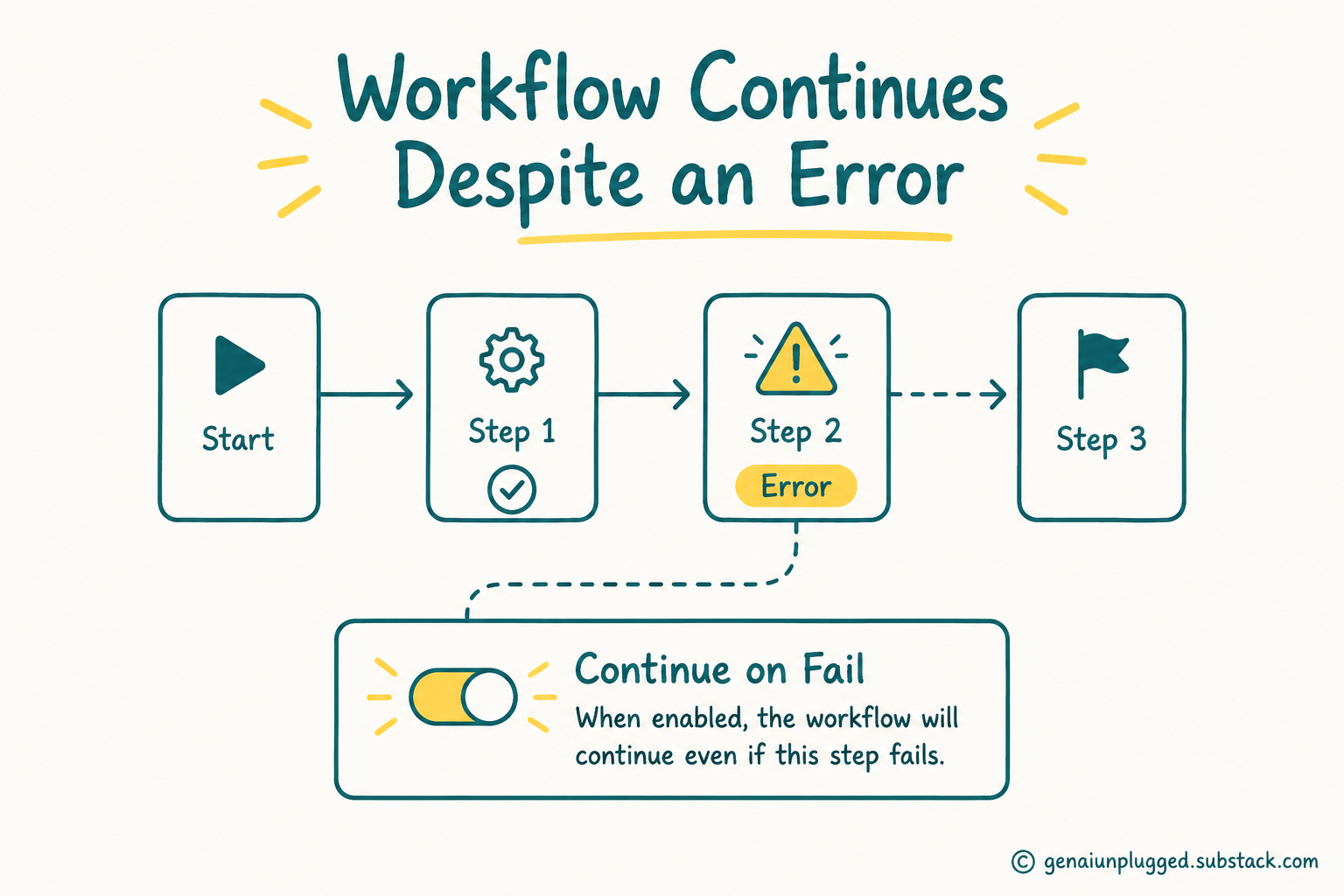
Continue On Fail lets the workflow proceed past a failed node instead of stopping. It's correct when the failure is genuinely non-critical, like an optional enrichment API call. It's wrong when used as a lazy fix to stop workflows halting, because it silently swallows failures that should have triggered a retry or an alert. This is the single most common misuse we see in client workflows.
The mistake we see most often in client workflows
Teams enable Continue On Fail on a node that writes to a CRM or sends a WhatsApp message, thinking it makes the workflow "more reliable" because it no longer stops. It doesn't make anything reliable, it just hides the failure. The workflow finishes green, but the customer never got their message. Reliability isn't the absence of red executions, it's knowing exactly what happened in every one.
The retry limitation nobody mentions: n8n retries from the start, not the failed node
What actually happens when a workflow retries automatically
When Retry On Fail is configured on a node, that node retries with the same input it received on the first attempt. But if a workflow is re-triggered externally (say, by an Error Trigger routing back to the original trigger), it restarts from the beginning, not from the failed node. Save Execution Progress stores data at each step so a manual retry can resume partway through, but this only applies to manual re-runs from the executions list, not automatic Retry On Fail. "Continue (using error output)" routes failed items down a separate branch so you can handle them without stopping the whole run, which is closer to real node-level control than most people realise, but it still isn't the same as resuming a multi-step workflow from the exact point of failure.
Why this matters for idempotency design
If a workflow creates an invoice, sends a WhatsApp confirmation, then updates a CRM record, and the CRM step fails, a naive retry re-runs all three steps. You now have two invoices and two WhatsApp messages sent to the same customer. This is the detail almost every other n8n guide skips entirely, and it's the one that causes real damage in production. We've watched a client send duplicate payment confirmations to 47 customers in one morning because nobody caught this during testing.
A pattern for safe retry on nodes with side effects: payments, messages, CRM writes
Before any side-effecting action, check whether it already happened. Use an idempotency key: a unique reference (order ID, WhatsApp message ID, invoice number) checked against a lookup table or CRM field before the action fires. If it exists, skip. If it doesn't, proceed and record it immediately after success, not after the whole workflow finishes. This is exactly the pattern we use when building invoice automation loops for clients who can't afford duplicate billing.

Dead letter queues and the retry-then-escalate pattern
What a dead letter path looks like in n8n practically
A dead letter path is simply a place failed items land after retries are exhausted, instead of disappearing. In n8n this is usually a database table or a dedicated "failed items" workflow that logs the payload, the error, and the retry count, then waits for manual review or a scheduled reprocessing job. You own the recovery timeline, not n8n's retry scheduler.
Setting a max retry count before escalation
Don't retry forever. Set a hard limit, three to five attempts with increasing delay, and once exhausted, push the item to the dead letter table and fire a real alert. Endless silent retries just delay the failure, they don't fix it. A payment webhook that retries for three days straight isn't a solution, it's a problem you haven't noticed yet.
Queue mode and centralized error routing
In queue mode, a main n8n instance handles triggers and UI while separate worker processes execute the actual workflows via Redis-backed queues. This isolates failures: a crashed worker doesn't take down your webhook listener, and lets you route all worker errors through one Error Trigger workflow regardless of which worker processed the job. This setup matters once you're past a handful of automations and hitting real traffic volume. Early stage, single-process n8n is fine. At scale, queue mode becomes mandatory.
Alert design: stopping alert fatigue, not just adding Slack
Why 'send to Slack' alone fails within a week
A raw Slack webhook on every error works for about a week before someone mutes the channel. Rate limits fire dozens of times during a traffic spike, one Slack message per failure buries the one alert that actually mattered. You need filtering or you lose signal in the noise.
Deduplication, severity routing, and threading
Group identical errors within a time window into one message with a count. Route by severity: payment and message-delivery failures go to a paged channel, everything else goes to a daily digest. Thread repeated failures from the same workflow so they don't scroll the channel into noise.
What a useful alert actually contains
A good alert has the workflow name, the failed node, the actual error message, the execution ID (linked, clickable), and the customer or record affected if relevant. "Workflow failed" with no context forces someone to go digging before they can even start fixing it.
Infrastructure choices that affect reliability, not just node settings
SQLite vs PostgreSQL in production
SQLite is the default and it's fine for testing. Under real concurrent load, especially with queue mode, it becomes a bottleneck and a corruption risk. PostgreSQL is the only sensible choice for production n8n. Use it from day one if you're touching real customer data.
Environment overlays and rate governance
Separate staging and production credentials at the environment level, not just in your workflows. Put rate limiting in front of anything calling PayFast, Yoco, or WhatsApp's API so a runaway loop doesn't burn your API quota or trigger a ban. A single malformed loop can blacklist your credentials for 24 hours, and that's expensive in ZAR.
South African production risks n8n error handling has to cover
PayFast and Yoco webhook failures: what a silent failure costs you
If a PayFast or Yoco webhook fails silently, the customer paid but your system never marked the order as paid. That's a support ticket, a refund dispute, or a lost sale, in ZAR terms, on every single occurrence. Webhook retries from these providers exist, but your workflow still needs to acknowledge them correctly and alert on repeated failures. If you're taking payments this way, the webhook handling specifics matter: PayFast and Yoco both retry failed webhooks multiple times, but only if you return a 200 response. If your n8n workflow fails silently, they'll retry once or twice more, then give up, and the payment is now stuck in a state nobody can resolve without manual intervention.
WhatsApp Business API delivery failures and network instability
Load-shedding and patchy mobile networks mean message delivery failures aren't rare edge cases here, they're routine. Your error handling needs to distinguish "WhatsApp API rejected this" from "temporary network timeout, retry it." The delivery status webhook patterns matter: if you don't log delivery failures correctly, you have no way to know whether a message actually landed or whether the customer never received the OTP or payment confirmation. This isn't theoretical.
POPIA and what you're allowed to log in an error payload
Error payloads often contain customer phone numbers, names, or payment references. Under POPIA, that's personal information, and it needs the same protection in your error logs and dead letter tables as it does anywhere else. Don't dump full customer records into a Slack channel; log a reference ID and pull details from your CRM only when needed. Error logs are still data you hold, and POPIA requires you to justify what you keep and for how long.
Monitoring workflow health beyond failure alerts
Execution logging for success metrics, not just errors
Track successful execution counts and durations over time, not just failures. A workflow that suddenly runs twice as slow, or half as often, is telling you something before it fully breaks. Slow isn't broken until it is.
Stale workflow detection: nothing ran in 24 hours
A workflow that should run hourly but hasn't run in a day usually means the trigger died, not that there's simply nothing to do. Build a scheduled check that flags workflows with no executions in their expected window. This catches the silent failures that look like "no data to process" when they're actually "trigger stopped firing."
A simple health dashboard using the n8n API
n8n's REST API exposes execution history and workflow status. A basic dashboard pulling this data—success rate, average duration, last run time, per workflow—gives you a real picture of system health instead of waiting for something to break. This fits naturally alongside any customer-facing automation you're running.
A production error-handling checklist
Every workflow has an Error Trigger pointing to a central error-handling workflow. Retry On Fail is used only for transient, side-effect-free failures. Continue On Fail is never used to hide failures on critical nodes. Idempotency checks exist before every payment, message, or CRM write. A dead letter table captures items after max retries, with a manual review process. Alerts are deduplicated, severity-routed, and contain execution IDs. Production runs on PostgreSQL, with queue mode if volume justifies it. Error payloads are stripped of unnecessary personal information per POPIA. A stale workflow check runs daily across all scheduled automations. A health dashboard tracks success rate and duration, not just failures.
Common questions
How do I retry a failed n8n workflow automatically? Enable Retry On Fail on individual nodes for transient errors, setting a max attempt count and wait time. For full-workflow retries, use an Error Trigger workflow that re-fires the original trigger after checking an idempotency key, so you don't duplicate side effects like payments or messages on the retry attempt.
What is the Error Trigger node in n8n and how does it work? Error Trigger starts a separate workflow whenever a linked workflow fails with an unhandled error. You set it under each workflow's settings as the "Error Workflow." n8n passes error details, including the failed node and execution ID, so you can log, alert, or route the failure without touching the original workflow's logic.
Can n8n retry from the specific node that failed, not the whole workflow? Not automatically for full workflow retries triggered externally, they restart from the trigger. "Continue (using error output)" on individual nodes lets failed items branch separately within a single run without restarting the whole workflow, which is the closest native option to node-level recovery n8n offers.
How do I get a Slack or email alert when an n8n workflow fails? Build a central error-handling workflow triggered by Error Trigger, then add a Slack or email node inside it. Filter by severity so only critical failures (payments, message delivery, CRM writes) alert immediately, and route lower-priority errors to a log or daily digest instead of pinging every time.
What's the difference between Retry On Fail and Continue On Fail? Retry On Fail re-attempts the same node a set number of times before giving up, useful for transient errors like rate limits. Continue On Fail lets the workflow proceed past a failed node without retrying, useful only for genuinely optional steps. Using Continue On Fail on critical nodes hides failures instead of fixing them.
How do I stop n8n workflows from failing silently? Attach an Error Trigger workflow to every production automation, log every failure with context, and alert on the ones that need immediate action. Silent failure is the default behaviour, not a flaw, so it only stops once you build explicit logging and alerting on top of the base workflow.
What is a dead letter queue in n8n and do I need one? A dead letter queue is a table or workflow where failed items land after retries are exhausted, instead of vanishing. You need one for anything touching payments, customer messages, or CRM records, since losing those silently causes real business damage that's expensive to trace after the fact.
How do I prevent duplicate records when retrying a workflow with side effects like CRM writes or emails? Use an idempotency key, an order ID, message ID, or invoice number, checked against a lookup before the side-effecting action runs. If the key already exists, skip the action. Record the key immediately after success, not at the end of the workflow, so partial retries can't repeat completed steps.
Is n8n reliable enough for production or mission-critical workflows? Yes, with the right setup: PostgreSQL instead of SQLite, queue mode for volume, Error Trigger workflows on everything critical, and idempotent design around side effects. n8n's core engine is stable, but "reliable" only comes from the error handling and infrastructure choices you build around it, not from default settings.
How do I monitor n8n workflow health over time, not just failures? Pull execution history from n8n's REST API into a simple dashboard tracking success rate, average duration, and last-run time per workflow. Combine this with a stale workflow check that flags anything overdue to run. This catches degradation and silent trigger failures before they turn into full outages.
If you're running n8n workflows that touch payments, WhatsApp messaging, or customer records and you're not sure your error handling would actually catch a real failure, message Sagentics on WhatsApp and we'll walk through it with you.
Common questions
How do I retry a failed n8n workflow automatically?
Enable Retry On Fail on individual nodes for transient errors, setting a max attempt count and wait time. For full-workflow retries, use an Error Trigger workflow that re-fires the original trigger after checking an idempotency key, so you don't duplicate side effects like payments or messages on the retry attempt.
What is the Error Trigger node in n8n and how does it work?
Error Trigger starts a separate workflow whenever a linked workflow fails with an unhandled error. You set it under each workflow's settings as the "Error Workflow." n8n passes error details, including the failed node and execution ID, so you can log, alert, or route the failure without touching the original workflow's logic.
Can n8n retry from the specific node that failed, not the whole workflow?
Not automatically for full workflow retries triggered externally, they restart from the trigger. "Continue (using error output)" on individual nodes lets failed items branch separately within a single run without restarting the whole workflow, which is the closest native option to node-level recovery n8n offers.
How do I get a Slack or email alert when an n8n workflow fails?
Build a central error-handling workflow triggered by Error Trigger, then add a Slack or email node inside it. Filter by severity so only critical failures (payments, message delivery, CRM writes) alert immediately, and route lower-priority errors to a log or daily digest instead of pinging every time.
What's the difference between Retry On Fail and Continue On Fail?
Retry On Fail re-attempts the same node a set number of times before giving up, useful for transient errors like rate limits. Continue On Fail lets the workflow proceed past a failed node without retrying, useful only for genuinely optional steps. Using Continue On Fail on critical nodes hides failures instead of fixing them.
How do I stop n8n workflows from failing silently?
Attach an Error Trigger workflow to every production automation, log every failure with context, and alert on the ones that need immediate action. Silent failure is the default behaviour, not a flaw, so it only stops once you build explicit logging and alerting on top of the base workflow.
What is a dead letter queue in n8n and do I need one?
A dead letter queue is a table or workflow where failed items land after retries are exhausted, instead of vanishing. You need one for anything touching payments, customer messages, or CRM records, since losing those silently causes real business damage that's expensive to trace after the fact.
How do I prevent duplicate records when retrying a workflow with side effects like CRM writes or emails?
Use an idempotency key, an order ID, message ID, or invoice number, checked against a lookup before the side-effecting action runs. If the key already exists, skip the action. Record the key immediately after success, not at the end of the workflow, so partial retries can't repeat completed steps.
Is n8n reliable enough for production or mission-critical workflows?
Yes, with the right setup: PostgreSQL instead of SQLite, queue mode for volume, Error Trigger workflows on everything critical, and idempotent design around side effects. n8n's core engine is stable, but "reliable" only comes from the error handling and infrastructure choices you build around it, not from default settings.
How do I monitor n8n workflow health over time, not just failures?
Pull execution history from n8n's REST API into a simple dashboard tracking success rate, average duration, and last-run time per workflow. Combine this with a stale workflow check that flags anything overdue to run. This catches degradation and silent trigger failures before they turn into full outages.
About Sagentics
Sagentics is an AI systems studio based in South Africa. We design and build WhatsApp automation, n8n workflows, and custom AI products for local and international clients. We write from systems we have actually shipped.
Start a WhatsApp conversation with SagenticsRelated reading
- Document automation for quotes and invoices: how to build the full loop in n8n
- n8n workflow automation guide: what it is, what it costs, and whether it's right for your business
- n8n vs Make vs Zapier: which one actually wins in 2026
- Self-hosting n8n vs cloud: what actually decides it
- n8n workflow automation guide
- self-hosting n8n vs cloud
- accepting payments through WhatsApp with PayFast or Yoco
- building an invoice automation loop in n8n
- connecting WhatsApp to n8n
- what POPIA actually requires for WhatsApp automation
- n8n lead capture and CRM automation
- when n8n beats custom code
- custom AI development for South African businesses