

 Start a conversation
Workflow automation with n8n
How to connect WhatsApp to n8n

Connecting WhatsApp to n8n comes down to one decision made early and one setup step everyone gets wrong later. First, pick your path: Meta's official Cloud API, which requires business verification and bills you per template message, or a faster unofficial session-based API that skips verification but isn't sanctioned by Meta. Second, once you've picked, set up the right credential type in n8n. The WhatsApp API credential and the WhatsApp OAuth Account credential are not interchangeable, and mixing them up is the single most common reason a working-looking setup produces a trigger that never fires.
We've built enough of these to know most tutorials stop right where the real problems start. This one doesn't.
Two ways to connect WhatsApp to n8n, and which one you actually need
You have two real options. Meta's official WhatsApp Business Cloud API, or an unofficial session-based API that logs in as a regular WhatsApp Web session. Neither is universally "better." They solve different problems.
Official Meta Cloud API: verification, templates, per-message billing
The Cloud API is Meta's sanctioned route. It requires a Meta Business account, an approved WhatsApp Business Account, and (if you want to message people who haven't messaged you first) approved message templates. You get stability, official support, and no risk of a number getting banned. You also get a verification queue that can take days to weeks, and per-message billing once you're outside the free service window. If you want to understand how this compares to the consumer app before building anything, read our breakdown of WhatsApp Business API vs the app.
Session-based unofficial APIs: faster, but not sanctioned by Meta
Session-based libraries (built on WhatsApp Web protocols) let you connect a number to n8n in under an hour, no verification, no template approval, no waiting on Meta. The catch: these run against Meta's terms of service. A number can get flagged or banned with no appeal process. We say this plainly because most write-ups either ignore the risk or bury it in a disclaimer at the bottom.
How to decide in five minutes based on your use case
If you're running regulated marketing at scale, sending order confirmations or payment reminders to hundreds of customers, or need this to survive an audit, use the official API. If a client needs something working this week for internal testing, a small pilot, or low-volume support, and isn't sending bulk template messages, a session-based API gets there faster. We tell clients this trade-off outright rather than defaulting them into whichever option sounds more official.
Setting up the official WhatsApp Business API with n8n
Here's the actual sequence, including the steps most guides skip.
Create a Meta Business account and app
Go to Meta for Developers, create a Business app, and add the WhatsApp product to it. This gives you a test number and a temporary access token automatically, which is enough to send your first test message before you commit to permanent setup.
Get your access token, WhatsApp Business Account ID, Client ID, and Client Secret
You'll need a permanent access token (generated via a System User in Meta Business Settings, not the temporary one from the quick start), your WhatsApp Business Account ID, and your app's Client ID and Client Secret from the App Dashboard. Write these down together. n8n's credential form asks for all four at once, and it's easy to grab one from the wrong tab in Meta's console.
Add a dedicated phone number (not already registered on WhatsApp)
The number you register with the Cloud API can't already be active on regular WhatsApp or WhatsApp Business app. It needs to be a clean number, capable of receiving an SMS or voice call for verification. This trips up more setups than anything else in this section, teams try to reuse an existing support line and get stuck.
Configure the credential in n8n and add the WhatsApp node
In n8n, create a new credential of type "WhatsApp API" (not OAuth Account, more on that below), paste in your access token, phone number ID, and business account ID, then drop a WhatsApp node into your workflow and point it at that credential.
Send a test message and confirm the webhook trigger fires
Send a message from your test number, then check that n8n's WhatsApp Trigger node actually receives the webhook event. This is the step people skip, they assume because the node saved without errors that the connection works. It doesn't confirm the webhook is live. Test this before building anything downstream.
If you want the fuller picture of building workflows generally, our n8n workflow automation guide covers the fundamentals this article assumes.
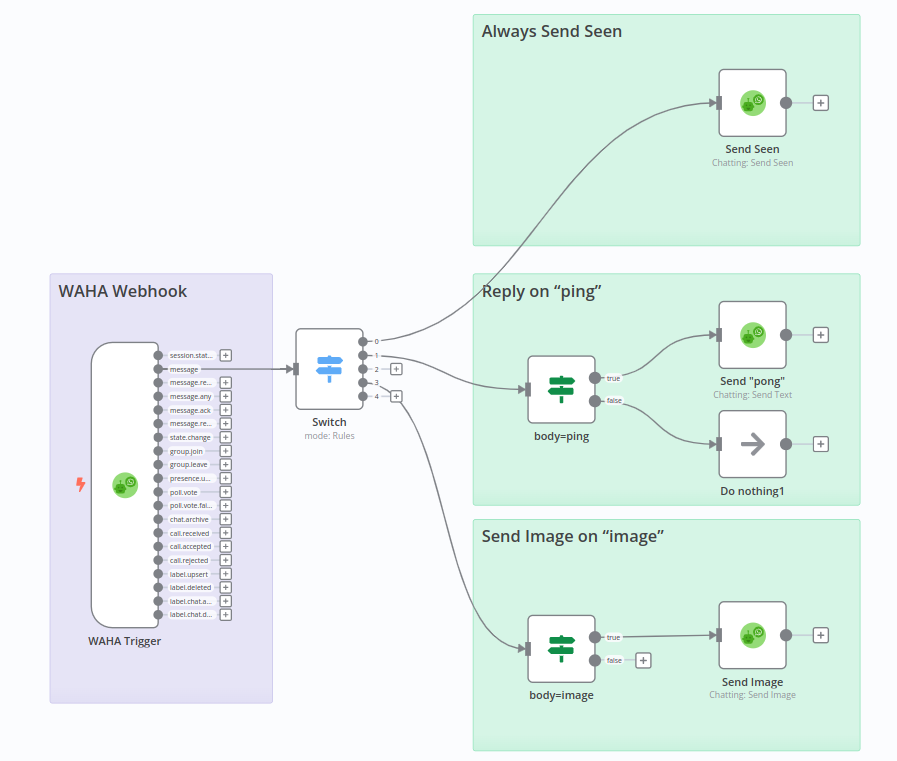
The credential confusion nobody explains: WhatsApp API vs WhatsApp OAuth Account
This is the part that causes weeks of quiet frustration, and it's the core of our original angle here: the failure looks exactly like a webhook misconfiguration, but it's actually a credential mismatch.
What each credential type actually authenticates
The "WhatsApp API" credential authenticates direct calls to Meta's Graph API using your access token, phone number ID, and business account ID. It's what you use for sending and receiving messages via the Cloud API directly. The "WhatsApp OAuth Account" credential is built for a different flow, one where n8n handles the OAuth authorization dance on your behalf, typically for on-premises API setups or specific embedded signup flows.
Why mixing them up causes silent trigger failures
If you configure your WhatsApp node with the API credential but your trigger node is expecting an OAuth Account connection (or vice versa), n8n won't throw a clear error. It just sits there. No incoming messages register, no webhook fires, and everything upstream (Meta's app dashboard, your webhook subscription, your callback URL) looks perfectly fine. Teams spend days re-checking webhook URLs when the actual problem is one dropdown menu in the credential setup.
Which one to use for Cloud API vs on-premises setups
For the standard Cloud API setup (the one 90% of businesses need), use the WhatsApp API credential. Reserve the OAuth Account credential for on-premises API deployments or specific partner integrations where n8n is explicitly documented to need it. When in doubt, check which credential type the specific node version in your n8n instance actually lists as required, this has changed between n8n releases.
Why some setups still don't work after weeks of trying
Beyond the credential mismatch, there are a handful of repeat offenders.
Common failure points from real n8n community threads
Expired temporary access tokens (they last 24 hours unless you generate a permanent one), phone number IDs copied from the wrong app environment (test vs production), and workflows left inactive in the n8n editor, a trigger only listens when the workflow is switched on and saved as active, not just open in the editor.
Webhook verification and callback URL mistakes
Meta requires you to verify your webhook URL with a specific challenge-response handshake before it'll send you anything. If your n8n instance isn't publicly reachable (common on local or unexposed self-hosted setups), this verification fails silently and Meta just won't deliver events. You need a public HTTPS URL, whether that's n8n cloud or a self-hosted instance behind a proper reverse proxy.
Business verification delays and template approval gaps
Meta's business verification can take anywhere from a day to several weeks, and template message approval is a separate queue with its own review criteria. Building a workflow that depends on an unapproved template will look complete in n8n and fail at send time. Plan your timeline around Meta's queues, not your own.

What it costs to run WhatsApp through n8n
The billing model catches South African teams off guard more than any technical step.
Service conversations are free, template messages aren't
If a customer messages you first, you get a 24-hour window to reply for free, as many messages as you need. Once that window closes, or if you're initiating contact, you need an approved template, and that's billed per conversation.
Recipient-country pricing: why a message to Germany costs more than one to South Africa
This is the detail almost nobody flags clearly: Meta prices conversations based on the recipient's country code, not the sender's. A Cape Town business running the same n8n workflow to message a customer in Johannesburg and a customer in Berlin will pay different rates for those two messages, even though the workflow, the template, and the sending number are identical. If you're doing cross-border customer support or e-commerce confirmations, this matters for budgeting, your cost per message isn't fixed, it moves with your customer base.
Self-hosted n8n vs n8n cloud cost trade-offs
Beyond WhatsApp's own billing, you're also choosing how you host n8n itself. Self-hosting gives you full control and can be cheaper at volume, but you carry the server, uptime, and security work. n8n cloud costs more per month but removes that overhead. We've written a full comparison of self-hosting n8n vs cloud if you're weighing this for a production WhatsApp workflow. For a full ZAR-based cost breakdown across both WhatsApp fees and hosting, see what WhatsApp automation actually costs in ZAR.
POPIA and data handling once WhatsApp is connected
Connecting WhatsApp to n8n means you're now processing personal information, and POPIA applies the moment that data touches your systems.
What POPIA actually requires for WhatsApp message data
You need a lawful basis for processing (usually consent or contractual necessity), a clear purpose for collecting the data, and reasonable security safeguards around storage and access. Message content, phone numbers, and any customer details captured through your workflow all count as personal information under POPIA.
Where your data lives once n8n processes it
If you're self-hosting n8n on South African infrastructure, your data residency question is simpler. If you're using n8n cloud or routing through Meta's servers (which are outside South Africa), you need to document that cross-border transfer and make sure your privacy notice actually reflects it. Don't assume "it's just WhatsApp" exempts you from this.
Data protection officer requirement before going to production
Depending on your processing volume, POPIA may require you to appoint an Information Officer registered with the Information Regulator before you go live with any system handling customer data at scale. This is a governance step, not a technical one, but it's one businesses frequently only discover after launch. We go deeper on whether your setup is POPIA compliant in a dedicated piece.
What to build once the connection works
Once the connection is solid, the workflow ideas are the easy part.
Customer support and escalation to a human agent
Route incoming messages through an AI agent for first response, then escalate to a human when the query needs judgment, a refund, a complaint, anything outside a defined script. We cover this pattern in detail in building an AI customer service agent on WhatsApp.
Order confirmations, reminders, and payment alerts
Trigger a WhatsApp template the moment a PayFast or Yoco payment clears, or send a reminder 24 hours before an appointment. This is one of the highest-value, lowest-complexity builds for South African SMEs.
Lead capture into a CRM
Capture inbound WhatsApp enquiries, parse the message with a quick AI step, and push structured data straight into your CRM. No manual copying, no leads lost in a chat thread. If you're comparing n8n against other automation tools for this kind of build, see how n8n compares to Make and Zapier.
Common questions
Do I need the WhatsApp Business API to use n8n, or does the regular app work? The regular WhatsApp app has no official API and can't connect to n8n directly. You need either Meta's WhatsApp Business Cloud API or an unofficial session-based API library. For anything beyond casual testing, especially production use, the Cloud API is the safer, sanctioned route.
What credentials do I need to connect WhatsApp to n8n? For the standard Cloud API setup, you need a permanent access token, your WhatsApp Business Account ID, your app's Client ID and Client Secret, and a phone number ID from a dedicated, verified number. All four go into n8n's WhatsApp API credential form.
What's the difference between the WhatsApp API credential and WhatsApp OAuth Account credential in n8n? WhatsApp API authenticates direct Graph API calls using your access token and account IDs, used for standard Cloud API setups. WhatsApp OAuth Account handles an OAuth-based flow, typically for on-premises API or embedded signup. Using the wrong one causes a trigger that silently never fires.
Is it safe to connect WhatsApp to n8n? Yes, using the official Cloud API, since it runs through Meta's sanctioned infrastructure with proper authentication. Unofficial session-based APIs carry a real risk of number bans since they violate Meta's terms. Either way, secure your n8n instance and credentials properly since you're handling live customer data.
Do I need a dedicated phone number for WhatsApp Business API? Yes. The number can't already be registered on regular WhatsApp or the WhatsApp Business app. It needs to be a fresh number capable of receiving an SMS or voice call for the verification step during setup.
Is the WhatsApp Business API free? Partly. Replying within a 24-hour customer service window is free. Sending approved template messages outside that window, or initiating contact, is billed per conversation, and pricing is based on the recipient's country code, not yours.
Why does my n8n WhatsApp trigger not fire even after following the tutorial? The most common cause is a credential mismatch, using the wrong credential type for your setup, followed by an inactive workflow, an expired temporary access token, or a webhook that never passed Meta's verification handshake because n8n wasn't publicly reachable.
Is connecting WhatsApp to n8n POPIA compliant for a South African business? It can be, but connecting the tools doesn't make you compliant automatically. You need a lawful basis for processing, clear documentation of where data is stored (including cross-border transfers through Meta or n8n cloud), and possibly a registered Information Officer depending on your scale. See whether your setup is POPIA compliant for the full requirements.
Should I use the official API or an unofficial session-based API? Use the official API for regulated, high-volume, or long-term production use. Use a session-based API only for fast, low-risk pilots where you understand and accept the ban risk. Don't let a tutorial's speed promise decide this for you, decide based on what you're actually building.
If you're stuck on any part of this, from picking the right path to fixing a trigger that won't fire, WhatsApp automation for South African businesses is what we build. Send us a message on WhatsApp and we'll talk through what you're trying to do.
Common questions
Do I need the WhatsApp Business API to use n8n, or does the regular app work?
The regular WhatsApp app has no official API and can't connect to n8n directly. You need either Meta's WhatsApp Business Cloud API or an unofficial session-based API library. For anything beyond casual testing, especially production use, the Cloud API is the safer, sanctioned route.
What credentials do I need to connect WhatsApp to n8n?
For the standard Cloud API setup, you need a permanent access token, your WhatsApp Business Account ID, your app's Client ID and Client Secret, and a phone number ID from a dedicated, verified number. All four go into n8n's WhatsApp API credential form.
What's the difference between the WhatsApp API credential and WhatsApp OAuth Account credential in n8n?
WhatsApp API authenticates direct Graph API calls using your access token and account IDs, used for standard Cloud API setups. WhatsApp OAuth Account handles an OAuth-based flow, typically for on-premises API or embedded signup. Using the wrong one causes a trigger that silently never fires.
Is it safe to connect WhatsApp to n8n?
Yes, using the official Cloud API, since it runs through Meta's sanctioned infrastructure with proper authentication. Unofficial session-based APIs carry a real risk of number bans since they violate Meta's terms. Either way, secure your n8n instance and credentials properly since you're handling live customer data.
Do I need a dedicated phone number for WhatsApp Business API?
Yes. The number can't already be registered on regular WhatsApp or the WhatsApp Business app. It needs to be a fresh number capable of receiving an SMS or voice call for the verification step during setup.
Is the WhatsApp Business API free?
Partly. Replying within a 24-hour customer service window is free. Sending approved template messages outside that window, or initiating contact, is billed per conversation, and pricing is based on the recipient's country code, not yours.
Why does my n8n WhatsApp trigger not fire even after following the tutorial?
The most common cause is a credential mismatch, using the wrong credential type for your setup, followed by an inactive workflow, an expired temporary access token, or a webhook that never passed Meta's verification handshake because n8n wasn't publicly reachable.
Is connecting WhatsApp to n8n POPIA compliant for a South African business?
It can be, but connecting the tools doesn't make you compliant automatically. You need a lawful basis for processing, clear documentation of where data is stored (including cross-border transfers through Meta or n8n cloud), and possibly a registered Information Officer depending on your scale.
Should I use the official API or an unofficial session-based API?
Use the official API for regulated, high-volume, or long-term production use. Use a session-based API only for fast, low-risk pilots where you understand and accept the ban risk. Don't let a tutorial's speed promise decide this for you, decide based on what you're actually building.
About Sagentics
Sagentics is an AI systems studio based in South Africa. We design and build WhatsApp automation, n8n workflows, and custom AI products for local and international clients. We write from systems we have actually shipped.
Start a WhatsApp conversation with SagenticsRelated reading
- Document automation for quotes and invoices: how to build the full loop in n8n
- n8n workflow automation guide: what it is, what it costs, and whether it's right for your business
- n8n vs Make vs Zapier: which one actually wins in 2026
- Self-hosting n8n vs cloud: what actually decides it
- WhatsApp Business API vs the app
- n8n workflow automation guide
- self-hosting n8n vs cloud
- what WhatsApp automation actually costs in ZAR
- whether your setup is POPIA compliant
- building an AI customer service agent on WhatsApp
- how n8n compares to Make and Zapier
- WhatsApp automation for South African businesses